Showing posts with label FunTricks. Show all posts

Tuesday, May 08, 2012

Type "Zerg Rush" into Google Search for a Surprise


A yet another 'Easter Egg' by Google has given us a reason to goof off. This surprise by Google is based on the popular game StarCraft.

Type Zerg Rush into Google, the O’s in Google take over the page. If you double click, your cursor turns into a plus sign. Click on the O’s to wipe them out. Google then tabulates your score which is shown on top right  and, in a social media twist, lets you post your score on Google+.


For those unaware, Zergs are an alien race of insectoids in Blizzard Entertainment’s StarCraft. In the game you rush them by amassing your battle units and blitz them. Hence the name Zerg Rush for this surprise of Google.

Google’s motivation for this latest Easter Egg is not clear, except perhaps it may be a way to migrate more users to Google+.

Friday, April 20, 2012

Recover Data From Corrupt USB Drive or Memory Card


Causes & Symptoms of USB flash drive/Memory Card data loss:


  • Accidental formatting of USB flash drive or Memory Card
  • Virus attack on the drive or card
  • Power surges & electro-static discharge
  • Improper removal of the USB flash drive from a computer
  • Accidental deletion of files from USB flash drive
  • The file system of USB flash drive is displays as raw
  • Windows may ask if you want to format the USB flash drive

error displayed


How to Recover It:
  • Insert the Memory Card or USB Flash Drive in your computer & note the drive letter it gets.
  • In Start click on Run & type cmd to bring up command prompt
  • Type chkdsk <drive letter>: /r [example: if the drive i want to recover is E, then type chkdsk E: /r]

using cmd to recover


The chkdsk command checks a disk for structure corruption. The E: tells it what drive letter to use and the /r tells it to repair the issues it finds.


recovery of bad sectors & files


If you see any warning like "your drive is not a Windows XP drive" this is not an issue. You can continue on by pressing Y. It will start to run through the files and directories. You will feel a lot better when you see your file names. It proves all is not lost! Aren’t you glad you went this route instead of formatting it?

Alternatively, you may try softwares such as BadCopyPro.

Thursday, March 29, 2012

Web Pages in 3-D


Wish to view your favorite websites from all possible angles??


google's blogger.com in 3-D view


Well as of now this is quite possible in Firefox's Developer's Mode.


All you need to do is:

  • Right click on any web-page
  • Select "Inspect Element"
  • A bar will appear at bottom of the screen
  • Click on the 3D  button on this bar

Tips 'n' Tricks in 3-D view [from behind]


Tips 'n' Tricks in 3-D view [from front]

Sunday, March 18, 2012

Create Cool Characters On Facebook Chat


Want To Create Cool Characters & Faces in Your Facebook  chat & Messages...???


Just do the following: 

  • Copy the CODE given below a character
  • Paste it in your FB chat or message to generate cool characters...!!


Vendetta Mask


[[255006724575192]] [[255006727908525]] [[255006737908524]] [[255006734575191]] [[255006731241858]]
[[255006827908515]] [[255006831241848]] [[255006824575182]] [[255006817908516]] [[255006821241849]]
[[255006874575177]] [[255006871241844]] [[255006884575176]] [[255006877908510]] [[255006881241843]]
[[255006934575171]] [[255006931241838]] [[255006941241837]] [[255006944575170]] [[255006937908504]]
[[255007004575164]] [[255007001241831]] [[255006994575165]] [[255006997908498]] [[255006991241832]]
[[255007084575156]] [[255007101241821]] [[255007077908490]] [[255007091241822]] [[255007081241823]]


Captain Jack Sparrow


[[298356520217565]] [[298356516884232]] [[298356506884233]] [[298356510217566]]
[[298356513550899]] [[298356620217555]] [[298356606884223]] [[298356616884222]]
[[298356610217556]] [[298356613550889]] [[298356673550883]] [[298356676884216]]
[[298356666884217]] [[298356680217549]] [[298356670217550]] [[298356740217543]]
[[298356733550877]] [[298356743550876]] [[298356730217544]] [[298356736884210]]
[[298356823550868]] [[298356810217536]] [[298356820217535]] [[298356826884201]]
[[298356813550869]] [[298356906884193]] [[298356896884194]] [[298356900217527]]
[[298356903550860]] [[298356893550861]] [[298356950217522]] [[298356946884189]]


Superman...


[[299528860107644]] [[299528863440977]] [[299528866774310]] [[299528856774311]]
[[299528870107643]] [[299528950107635]] [[299528943440969]] [[299528946774302]]
[[299528953440968]] [[299528956774301]] [[299529013440962]] [[299529016774295]]
[[299529010107629]] [[299529003440963]] [[299529006774296]] [[299529060107624]]
[[299529063440957]] [[299529066774290]] [[299529070107623]] [[299529073440956]]
[[299529173440946]] [[299529183440945]] [[299529180107612]] [[299529176774279]]
[[299529186774278]] [[299529243440939]] [[299529236774273]] [[299529240107606]]


Elmo


[[302117289844540]] [[302117283177874]] [[302117276511208]] [[302117279844541]] [[302117286511207]] [[302117366511199]]
[[302117369844532]] [[302117373177865]] [[302117383177864]] [[302117379844531]] [[302117426511193]] [[302117436511192]]
[[302117429844526]] [[302117423177860]] [[302117433177859]] [[302117523177850]] [[302117529844516]] [[302117526511183]]
[[302117536511182]] [[302117533177849]] [[302117606511175]] [[302117596511176]] [[302117599844509]] [[302117593177843]]
[[302117603177842]] [[302117646511171]] [[302117649844504]] [[302117659844503]] [[302117656511170]] [[302117653177837]]
[[302117706511165]] [[302117703177832]] [[302117699844499]] [[302117709844498]] [[302117696511166]] [[302117749844494]]


Troll face


[[242538225822042]] [[242538222488709]] [[242538232488708]] [[242538219155376]] [[242538229155375]] [[242538339155364]]
[[242538335822031]] [[242538342488697]] [[242538345822030]] [[242538349155363]] [[242538392488692]] [[242538395822025]]
[[242538399155358]] [[242538402488691]] [[242538405822024]] [[242538475822017]] [[242538472488684]] [[242538489155349]]
[[242538492488682]] [[242538485822016]] [[242538562488675]] [[242538565822008]] [[242538569155341]] [[242538575822007]]
[[242538572488674]] [[242538612488670]] [[242538625822002]] [[242538619155336]] [[242538622488669]] [[242538615822003]]
[[242538675821997]] [[242538682488663]] [[242538672488664]] [[242538679155330]] [[242538685821996]] [[242538742488657]]


Mr. Bean


[[255016264574238]] [[255016271240904]] [[255016277907570]]
[[255016267907571]] [[255016274574237]] [[255016384574226]]
[[255016387907559]] [[255016394574225]] [[255016401240891]]
[[255016391240892]] [[255016464574218]] [[255016454574219]]
[[255016457907552]] [[255016461240885]] [[255016451240886]]
[[255016537907544]] [[255016531240878]] [[255016534574211]]
[[255016541240877]] [[255016527907545]] [[255016634574201]]


Note: This works only in PC/Laptop...Will not work if you're chatting from Mobile!
don't try it in comments it will not work... try it in chat and msg from pc to your friends & enjoy!

TRY THIS...ITS AMAZING... ;)

Saturday, March 10, 2012

Unshrink short URLs


It has become quite a trend to shorten links for websites & blogs so that people don't have to copy and paste long web addresses. But this leads to a problem. Where to these shortened links go??? Typically you have no way of knowing that where a shortened url takes you to!! You do have to be careful online not to follow unknown links that could lead to spyware/adware/viruses.

But there is a way if you use either Mozilla Firefox or Google Chrome as your web browser and by utilizing add-ons & extensions. Then while you are browsing, these links are automatically detected and converted to show where they really go.

For Firefox try 'Long URL Please' add-on, as advertised on BBC Click's Webscape. It supports lengthening the hyperlink of 80 shortening services including the most popular bit.ly, tinyurl.com & goo.gl.

Long URL Please works really fast and is reliable and dependable. It does exactly what it says on the tin! A great Firefox Add-on.

Friday, March 02, 2012

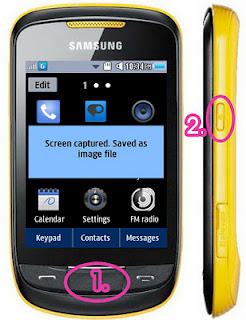
How To Take A Screen Capture From Corby 2


With Samsung Corby 2's built-in screen capture feature, taking screen shots right from your mobile device has never been so easy. No rooting required like some smart phones and no applications needed to be installed to enjoy this feature.

All you have to do is press and hold the menu key and the power button simultaneously. Once captured, you will see a message saying "Screen captured. Saved as image file." You can find it inside Images folder in a subfolder named "Screen capture." It is automatically saved on your phone memory. As of now, there is no known method to change the default memory for the screen shots.

samsung corby 2
screen capture

Saturday, February 25, 2012

Create Fake Tweet Builder & Fake Tweets

Love Those Funny Twitter Reply Thread???
Well here are some such funny twitter threads available at funtweets.com


You can make your own fake Twitter conversations, funny tweets at faketweetbuilder.com.

Simply enter text as:

Person1: Tweet    and on the next line

Person2: @ Reply Tweet     and so on as shown above
and click "Create Twitter Thread" to generate your own funny tweets, twitter reply threads & conversations.

How To Create Fake iPhone Text Messages

Love Those Funny AutoCorrect iPhone Text Conversations???
Well here are some such iPhone text conversations at damnyouautocorrect.com


You can generate your own fake iPhone conversations, texts at fakeiphonetext.com.

Simple enter text as
Person1: Text Message
and on the next line
Person2: Reply Message
and next line as
Person1: Text Message
and so on as shown below and click "Create" to generate your funny iphone conversations, text messages, autocorrect fails etc.


How To Create Fake Facebook Comments

Do You Love those Funny Facebook Comments on Status Fails???
Well, here are some fake facebook comments available at failbook.failblog.org


You can also create such fake Facebook Conversations at fakebookquotes.appspot.com
At the above site, Simple enter text as:
Person1: Status
and on the next line
Person2: Comment
and next line as
Person3: Comment
and so on as shown below and click "Create Facebook Quote" to generate your funny facebook comments conversation.


You can also create more natural looking facebook conversations at fakeconvos.com which lets you easily create fake Facebook news feeds and conversations with advanced settings..!

Tuesday, February 21, 2012

Find Serial Keys/Cracks for Any Software

Search for keys & cracks on Google, using this simple trick:

1. Open google.com
2. Type '94fbr' space and then the name of software whose crack/key you need. 
     [ Example: 94fbr Adobe Photoshop ]
3. Google will show you links with your desired serial key or cracks & files.
4. Enjoy!

Tuesday, February 14, 2012

Birthday Magic

Step1: Add 18 to your birth month
Step2: Multiply by 25
Step3: Subtract 333
Step4: Multiply by 8
Step5: Subtract 554
Step6: Divide by 2
Step7: Add your birth date
Step8: Multiply by 5
Step9: Add 692
Step10: Multiply by 20

Photoshop Effects: Examples

A collection of awesome Photoshop effects.
In most of these images we use 2 or 3 different images and flatten them after editing one of them. Using these examples and few simple Photoshop tricks, you can try creating your own collection of awesome pictures.
Effect 1: Flying High